

Chrome Canary’s new tab page now includes two new Gemini AI buttons, Nano Banana and Deep Search, allowing you to create images or research topics directly from the search box.
Google’s latest version of the Chrome new tab page adds two new buttons powered by its Gemini AI to Canary: “Nano Banana” and “Deep Search.” You’ll find these below the “Ask Google” search box. They’re designed to help you start a creative or research task instantly without having to go anywhere else.
Now, in Canary, Chrome’s new tab page already includes an AI mode button within the search box. This button lets you ask tricky questions, get short, helpful answers, and continue the chat for more information.
Below the box, there are now two new buttons, the AI action chip: Nano Banana and Deep Search. When you click one of them, it fills the box with some starting text based on what you want to do.
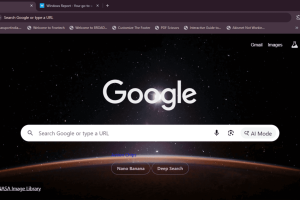
Nano Banana: This button connects to Google’s latest image-making AI. When you click it, you’ll see a box saying “Create…” where you can type in the image you want. This feature just appeared in the Chrome Canary release, so it may not be fully implemented or working correctly yet.
Deep Search: This button is for finding detailed information. Clicking it will show a box saying “Help me research…”. For example, you can ask “Indian children’s vaccines” and quickly get key details.
Currently, Chrome still crashes when using these tips, so we may have to wait a while before it works correctly.
Nano Banana and Deep Search work with Google’s Gemini AI. The first helps process images, and the second helps find and organize information. The new tab is no longer just a search bar; it’s now a place to start doing whatever you want.
The new tab in Chrome Canary now integrates these new features with AI modes, helpful tips, and special buttons into a single layout. When you open your browser, you can ask, create, or research directly from the start screen.